The Offer System: From Quote to Delivery
You've posted a part request. Sellers are interested. Now what? This is where offers come in - the bridge between your request and getting that part in your hands.
The offer system is completely free for both buyers and sellers. There are no listing fees, no transaction fees, no hidden costs. It's designed to make the process of buying and selling car parts as straightforward as possible.
Important: Offers are entirely optional. You can always negotiate via messages and arrange payment however works best for both parties. The offer system is simply there to make your life easier when you want structured quotes, easy comparison, and built-in transaction tracking.
How Offers Work
For Sellers: Creating an Offer
When you find a part request you can fulfill, start by sending a message to the buyer. This opens a conversation where you can discuss details, ask questions, and build trust.
Once you've had some initial conversation, you'll notice the euro button (€) in the message input area becomes active.
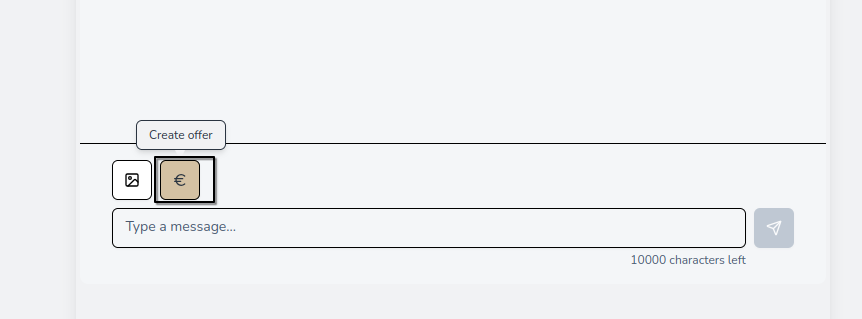
Click it to open the Create Offer dialog. Here you can specify everything the buyer needs to make a decision:
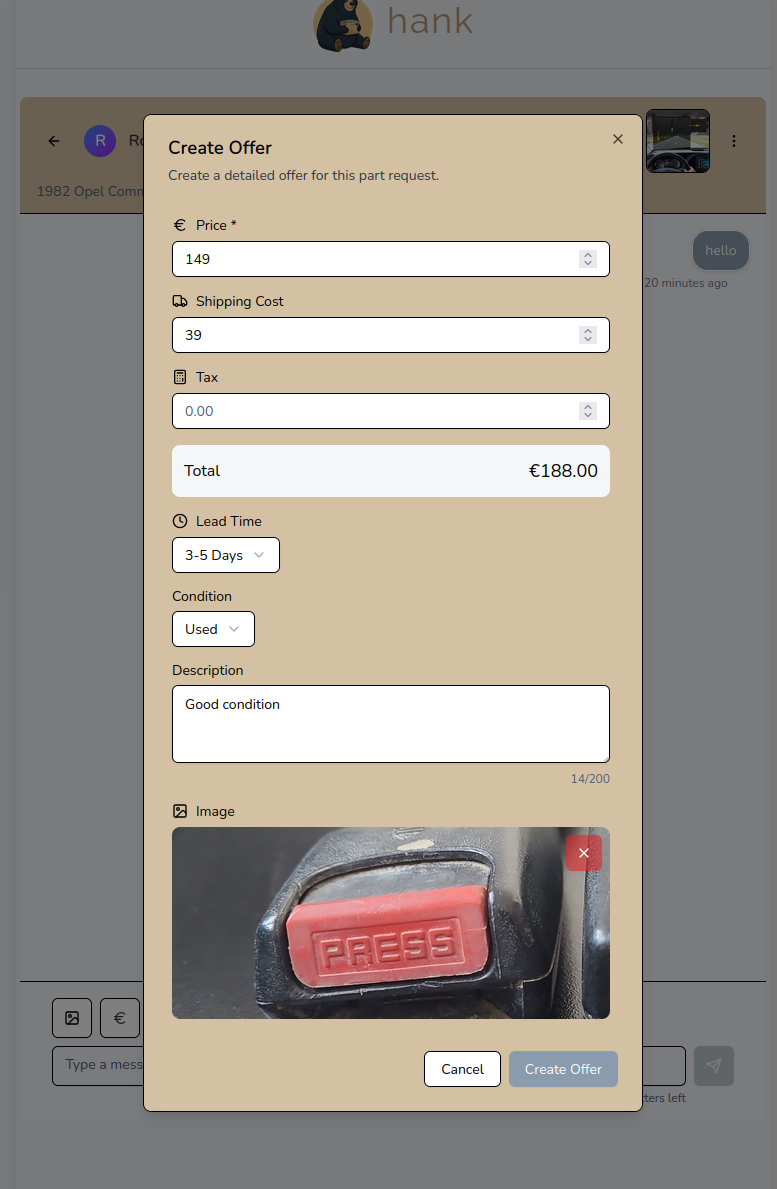
What you can include:
- Price: The part price in euros
- Shipping Cost: Delivery charges to the buyer's location
- Tax: Any applicable VAT or taxes
- Lead Time: How quickly you can ship
- Condition: New, used, or refurbished
- Description: Details about the specific part, its condition, any notes
- Image: A photo of the actual part you're offering
The system automatically calculates the total price so both you and the buyer know exactly what to expect.
For Buyers: Comparing Offers
This is where hank really shines. When multiple sellers respond to your part request, you can see all their offers in one place on the Offers page.
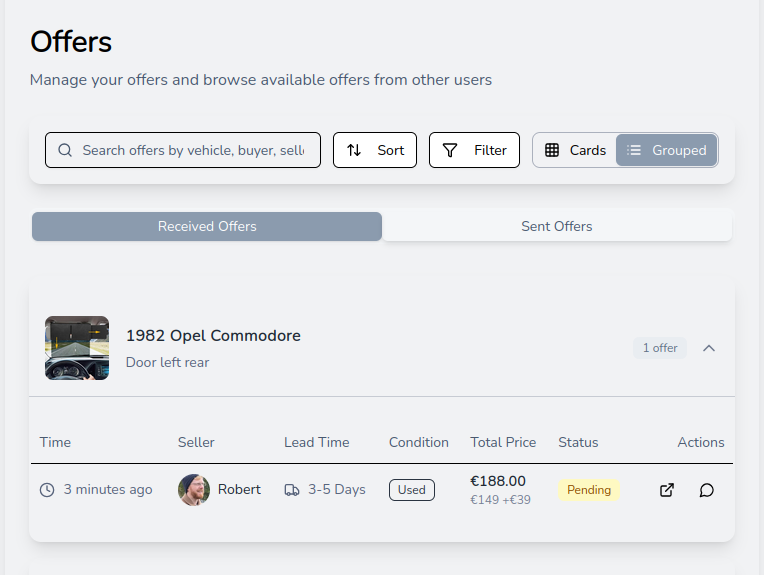
The grouped view shows offers organized by part request. At a glance, you can compare:
- Price breakdown: Base price plus shipping
- Lead time: How fast each seller can deliver
- Condition: New vs. used
- Seller: Who's making the offer
Use the search, sort, and filter options to find exactly what you're looking for. Filter by status (Pending, Accepted, Paid, Shipped, Received, etc.) to focus on offers at a specific stage. Sort by newest or oldest to see the most recent quotes first.
No more spreadsheets. No more keeping track of quotes across different emails and messages. Everything is in one place, ready for you to compare and decide.
The Transaction Flow
Once you find an offer you like, here's how the transaction progresses:
1. Accept the Offer
Found the right offer? Click Accept. This tells the seller you want to proceed and moves the transaction to the payment stage.
2. Make Payment
After accepting, you'll arrange payment directly with the seller via messages. Once you've paid, the seller confirms receipt of payment in the system.
3. Seller Ships the Item
The seller marks the order as shipped, and you'll receive a notification. The offer status updates to Shipped.
4. Confirm Delivery
When your part arrives, you'll see a prompt to confirm receipt:
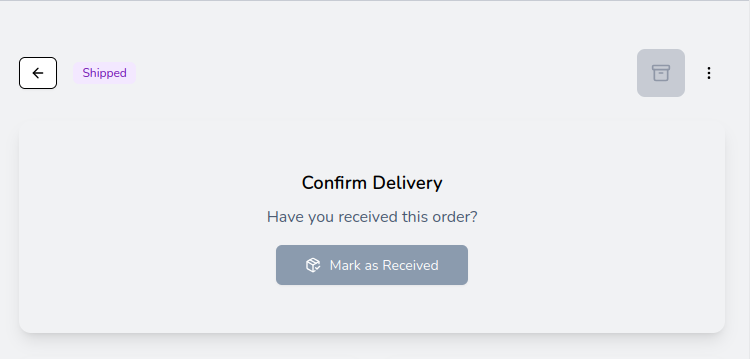
Click Mark as Received to complete the transaction.
Tracking Everything
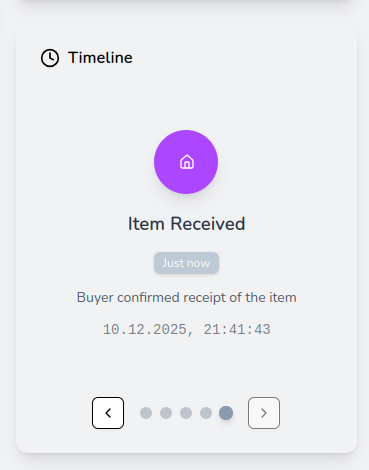
Every offer has a timeline that shows the complete history of the transaction:
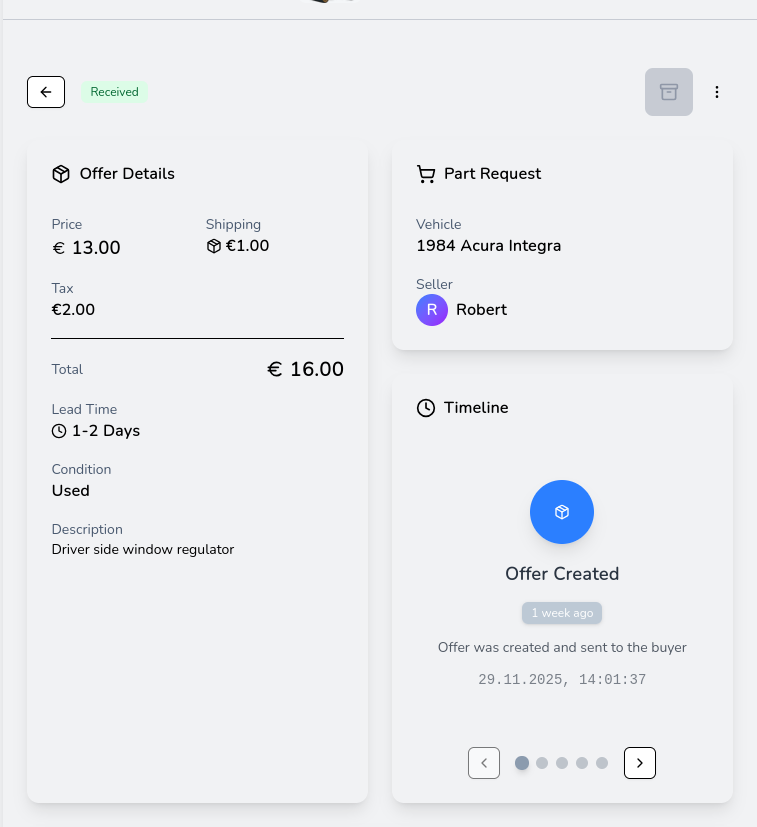
You can see exactly when:
- The offer was created
- You accepted it
- Payment was confirmed
- The item was shipped
- You received it
Both buyer and seller also receive system messages in their conversation, keeping everyone informed at each step:

These notifications include direct links to view the offer details, so you always know where things stand.
Why Use the Offer System?
You might wonder: why not just negotiate everything in messages? You absolutely can! But here's what the offer system gives you:
For Buyers:
- Easy comparison: See all offers side-by-side with consistent formatting
- Clear pricing: No confusion about what's included - price, shipping, and tax are all broken down
- Transaction tracking: Know exactly where your order is at every step
- History: Every offer and its status is saved in your account
For Sellers:
- Professional quotes: Send detailed, well-structured offers that inspire confidence
- Status visibility: Know when buyers accept, and track the transaction through completion
- Image support: Show buyers the exact part they'll receive
- Organized workflow: Manage all your sent offers in one place
For Everyone:
- Completely free: No fees whatsoever
- Optional: Use it when it helps, skip it when it doesn't
- Transparent: Both parties see the same information at every step
Tips for Great Offers
Sellers:
- Include a clear photo of the actual part you're selling
- Be specific in your description - mention part numbers, any wear, included accessories, or compatibility notes
- Set realistic lead times you can actually meet
- Price competitively - buyers can easily compare your offer with others
Buyers:
- Don't rush - wait for multiple offers before deciding
- Check seller profiles and ratings
- Ask questions via messages before accepting if anything is unclear
- Confirm receipt promptly so sellers know the transaction is complete
Ready to Try It?
Whether you're a buyer looking for the best deal on a part, or a seller ready to reach customers across Europe, the offer system is here to help. It's free, it's optional, and it's designed to make car parts transactions as smooth as possible.
Browse part requests, send some messages, and when you're ready - create your first offer.
Happy hanking!
Robert - hank team