How Auto Parts Dealers Find Customers Across Multiple Vehicle Brands
If you run a specialized automotive parts business that services multiple vehicle brands, you face a unique challenge: how do you find every potential customer across all the makes and models you service?
Speedometer specialists, carburetor rebuilders, transmission shops, and other component-focused businesses often work with 30, 50, or even 100+ different vehicle manufacturers. Your expertise is the component, not the brand - but traditional parts marketplaces force you to search by make and model.
The problem: You can't efficiently monitor buyer requests across dozens of brands without creating separate custom lists for every manufacturer you service.
The solution: Keyword-based lead filtering that focuses on your specialization, not vehicle brands.
This guide shows you how keyword search helps multi-brand auto parts dealers capture more qualified leads and grow their business.
The Multi-Brand Auto Parts Dealer Challenge
Traditional online parts marketplaces organize listings by vehicle brand: "BMW parts", "Volkswagen parts", "Toyota parts". This works great for general dealers who stock everything for one manufacturer.
But if you're a speedometer specialist servicing 50+ makes, or a carburetor rebuilder working on any classic car, you need to see every relevant request regardless of brand. Creating separate custom lists for each manufacturer means managing dozens of email digests daily - clearly not scalable.
How Keyword Filtering Works for Auto Parts Dealers
Instead of filtering buyer requests by vehicle brand, keyword filtering focuses on the component you specialize in. This approach is particularly powerful for businesses in the automotive aftermarket that service multiple manufacturers.
When creating a custom list on hank, you have access to multiple filter types:
- Make/Model - Filter by vehicle manufacturer
- Year - Filter by production year range
- Region - Filter by buyer location
- Part Number - Filter by exact part number (e.g., "12345-ABC")
- Description - Keyword search through buyer descriptions
The Description keyword filter is what enables multi-brand component specialists to find all relevant opportunities. Here's how it works on hank, a reverse marketplace for auto parts where buyers post requests and sellers respond:
Example: Speedometer Specialists
Instead of creating separate lists for "BMW speedometer", "Audi speedometer", "Ford speedometer", etc., create one list with a broad keyword:
List name: "Speedometer & Instrument Cluster Specialists"
Keyword filter: speedometer (searches descriptions for this term)
Make/Model: Leave empty (matches all)
Email notifications: Enabled
Now you receive daily digests with speedometer-related requests across all vehicle makes. Whether someone needs a speedometer for a 1985 Mercedes, a 2015 Toyota, or a vintage Porsche - if they mention "speedometer" in their description, you see the request.
Note: Since you can only use one keyword per list, choose the most common term buyers use. For speedometer specialists, "speedometer" captures most requests. You can create additional lists with related terms like "instrument cluster" or "tachometer" if you want broader coverage.
Why This Works: Description Keyword Search
Keyword search is specifically designed for the Description field where buyers explain what they need in natural language. This is separate from the Part Number filter, which is used for exact part number matching.
When buyers post part requests, they describe their problem or need in the description:
- "My speedometer stopped working after 200k miles"
- "Looking for instrument cluster, the tachometer needle is stuck"
- "Speedometer cable broken, need replacement cluster assembly"
Your keyword filter catches requests where buyers mention your search term in their description. In the examples above, a list with the keyword "speedometer" would match the first and fourth requests, while a separate list with "tachometer" would catch the second.
Important: Abbreviations and Slang Require Separate Lists
Keyword search benefits from automatic translation - if a Spanish buyer writes "velocímetro", your keyword speedometer will match it because hank translates descriptions into all supported languages.
However, keyword search doesn't expand abbreviations or slang within the same language. This means:
tachometerWILL match a Spanish buyer writing "tacómetro" (automatic translation works)tachometerwill NOT match a German buyer writing "tacho" (abbreviation in original language)speedometerwill NOT match an English buyer writing "speedo" (slang/abbreviation)dashboardwill NOT match any buyer writing just "dash" (abbreviation)
Why? Buyer descriptions are automatically translated into all languages, but the original text is also searchable. If someone writes "tacho" in German, the translations will correctly say "tachometer" (EN), "velocímetro" (ES), etc., but the original German text still contains only "tacho".
Solution: Create overlapping lists for abbreviations and slang terms used in the original language. This ensures nearly 100% coverage:
Example for tachometer/gauge specialists:
- List 1: Keyword
tachometer(matches all formal terms across all languages via translation) - List 2: Keyword
tacho(matches German/informal abbreviations in original text) - List 3: Keyword
speedo(matches English slang for speedometer) - List 4: Keyword
rev counter(British English alternative term)
What about duplicates? If a buyer request contains multiple keywords (e.g., "tachometer (tacho) broken"), it will appear in both your tachometer and tacho lists initially. However, once you view it in either list, it's automatically marked as "seen" in both lists and won't be included in future email digests. The duplicate handling is completely automatic - check one list, and the same request is marked as seen everywhere.
Real-World Use Cases: Multi-Brand Component Specialists
Carburetor Specialists: Finding Customers Across Decades of Vehicles
Business profile: You rebuild carburetors for classic and vintage vehicles from the 1950s through 1990s, servicing hundreds of different makes from American muscle cars to European imports.
The challenge: Carburetors exist across every vehicle manufacturer from this era. Creating individual custom lists for each brand (Ford, Chevrolet, Volkswagen, Mercedes, Porsche, Fiat, etc.) means managing 50+ separate email digests daily.
Keyword filtering solution:
Create a primary list:
- List name: "Carburetor Requests - All Brands"
- Keyword:
carburetor - Make: All (leave empty)
- Year range: 1950-1999
- Email notifications: Enabled
Recommended additional lists for complete coverage:
- List 2: Keyword
carb(common English slang/abbreviation) - List 3: Keyword
weber(specific carburetor brand frequently mentioned) - List 4: Keyword
solex(another popular carburetor brand)
Why multiple lists? While automatic translation handles formal terms (a German buyer writing "Vergaser" will match your carburetor keyword via translation), abbreviations and brand names need separate lists. Someone writing "Need weber carb for Mustang" uses slang that won't match carburetor, and mentions a specific brand that formal terms miss.
Result: 2-4 daily email digests containing carburetor requests across all vehicle brands. Automatic translation ensures you catch all languages, while multiple lists ensure you catch all abbreviations, slang, and brand-specific terms.
How to Set Up Keyword-Based Lead Filtering for Your Auto Parts Business
Follow these steps to create a keyword filter that captures every customer opportunity across all vehicle brands you service:
Step 1: Identify Your Component or Service Specialization
What defines your business across vehicle brands rather than within one brand?
Examples of multi-brand specializations:
- Speedometer/instrument cluster specialists
- Carburetor sales for classic vehicles
- Turbocharger sales and rebuilding
- Suspension components for performance vehicles
- Brake system specialists (calipers, master cylinders)
- Electrical components (alternators, starters, distributors)
If you find yourself saying "I work on [component] for almost any make", you're a multi-brand specialist who needs keyword filtering.
Step 2: Brainstorm Keyword Variations Your Customers Use
Think like buyers posting requests. They describe problems in natural language, use slang, and vary terminology. Since each custom list can only have one keyword, you'll need to prioritize which terms to use and potentially create multiple lists.
Key categories to brainstorm:
- Primary formal term - Most common technical name (automatic translation handles all languages)
- Abbreviations/slang - Shortened versions buyers actually use in their original language
- Brand names - Specific manufacturers frequently mentioned
- Related components - Parts often mentioned together with your specialty
Strategy: Start with your primary formal term as List 1. Then create additional lists (2-4) for common abbreviations, slang, and brand names to ensure complete coverage.
Step 3: Create Your Custom List on hank
- Log in to your hank account
- Navigate to Custom Lists in the dashboard
- Click Create List
- Name your list descriptively: "Speedometer Requests - All Makes" or "Headlight - All Brands"
- Set your filters:
- Make/Model: Leave empty to match all vehicle brands
- Year: Set range if relevant (e.g., 2000+ for modern headlights, 1950-1990 for carburetors)
- Region: Select if you only service certain countries
- Part Number: Leave empty (this is for exact part number matching, not keyword search)
- Description: Enter your single keyword here (e.g.,
speedometerorheadlight)
- Enable email notifications for daily lead digests
- Save
To capture more keyword variations, repeat steps 3-7 for each additional keyword you want to track. Each list will send a separate daily digest.
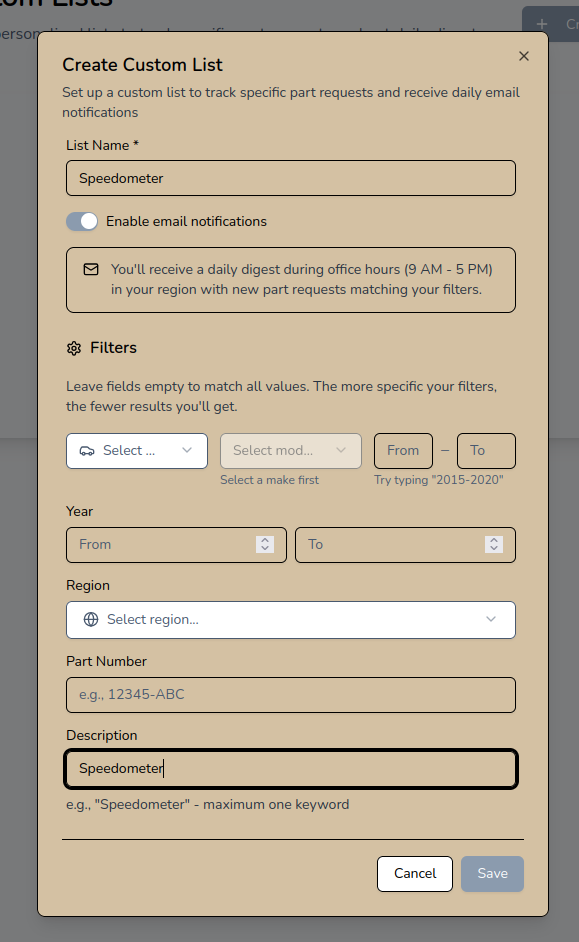
Creating a "Speedometer" custom list with keyword filter and email notifications enabled
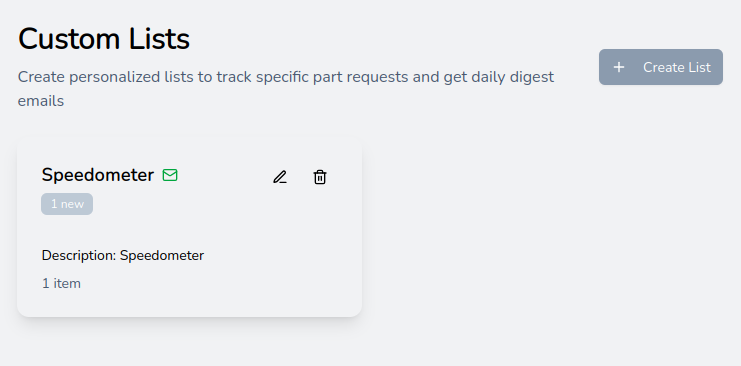
Your custom lists dashboard showing active "Speedometer" list with email notifications enabled and 1 new matching request
Step 4: Review Matching Requests
Once your custom lists are set up, you'll receive daily email digests during office hours (9 AM - 5 PM in your region) with new matching requests:
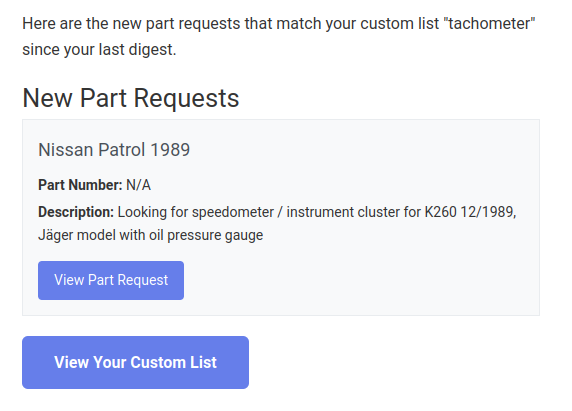
Daily digest email showing new part requests matching your "tachometer" custom list
Click through to view the full details of matching requests in your custom list:
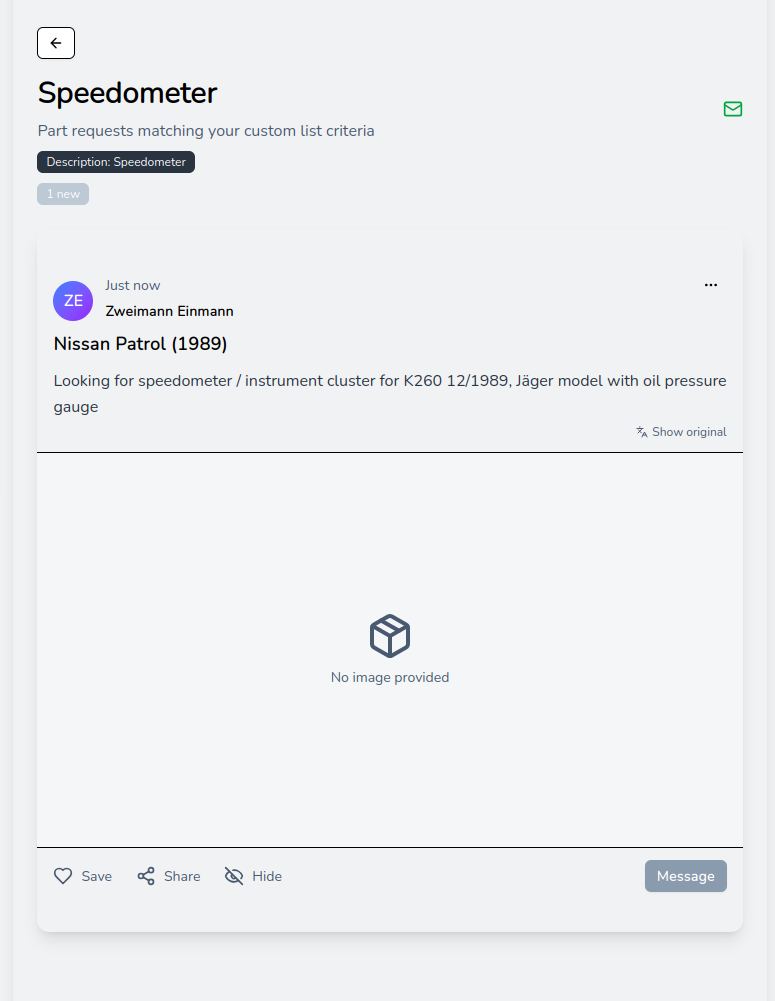
Custom list detail view showing a Nissan Patrol speedometer request that matched your keyword filter
Step 5: Monitor and Refine Your Keywords
After your first week of daily email digests, optimize your custom lists:
Too many irrelevant results?
- Tighten filters on that specific list (add year range, specific makes, or region)
- Try a more specific keyword (e.g., change
transmissiontoautomatic transmission) - Consider removing lists with overly broad keywords
Missing relevant requests you found manually?
- Create new lists with keyword variations from buyer descriptions
- Add lists for common slang terms (e.g., add
speedolist if you only hadspeedometer) - Include brand-specific terminology lists (e.g.,
kombi instrumentfor German instrument clusters)
80%+ relevance in your daily digests?
- Your keyword strategy is optimized
- Continue monitoring for new keyword opportunities
- Consider consolidating similar lists if you're getting too many daily emails
Get Started
If you're a multi-brand component specialist, keyword-based custom lists can transform how you find customers. Start with your primary keyword, add 2-4 variations for slang and abbreviations, and you'll never miss a sales opportunity again.
Ready to capture more qualified leads? Sign up for hank and create your first custom list with keywords today.
Happy hanking!
Robert - hank team